In [1]:
from CSE142L.notebook import * 
from notebook import *
from Question import Question
# if get something about NUMEXPR_MAX_THREADS being set incorrectly, don't worry.  It's not a problem.
setup_lab()
Lab 5: Parallelism
Or, if we are being honest, a lot of it is Caches Part III

Introduction

Modern computers exploit parallelism in many ways:

  1. They can execute multiple threads at once.
  2. They can execute instructions in parallel.
  3. They can handle multiple memory requests at once.

We are going to look at each of these kinds of parallelism, but we'll spend the most time on threading, since it's the form of parallelism that's most apparent to the programmers and the one that takes the most effort to exploit. Not surprisingly, we will find that much of what makes parallel code fast and slow has to do with how it uses memory.

In particular we are going to study:

  1. Instruction level parallelism.
  2. Memory-level parallelism.
  3. Thread-level parallelism.
    1. How it works.
    2. How to use it.
    3. Cache Coherence
    4. Synchronization
    5. False sharing
  4. Hyperthreading
  5. The OpenMP extensions for C/C++

This lab includes a programming assignment.

Check the course schedule for due date(s).

Additional Reading

If you want to learn a lot more about optimizing matrix multiply, try this paper: https://www.cs.utexas.edu/~flame/pubs/GotoTOMS_revision.pdf

Grading

Your grade for this lab will be based on the following components

Part value
Pre-lab quiz 2%
Jupyter Notebook 45%
Programming Assignment 50%
Post-lab survey. 3%

No late work or extensions will be allowed.

We will grade 5 of the "completeness" problems. They are worth 3 points each. We will grade all of the "correctness" questions.

You'll follow the directions at the end of the lab to submit the lab write up and the programming assignment through gradescope.

Please check gradescope for exact due dates.

Thread Performance

ILP and MLP exist within a single core, and the degree of parallelism is limited by the number of instructions the CPU can issue per cycle. To get more parallelism, we need to use more CPUs, and for that we'll need to create threads.

A thread is a flow of control through your program that runs on a processor. Every program has at least one thread, and by creating multiple threads you can spread the work of your program across many cores, hopefully improving it's performance.

Making programs fast via multi-threading is an extremely deep and complex area. We could easily spend an entire quarter studying techniques for creating, managing, and using threads, and most universities (including UCSD) offer several courses on this topic (Start with Operating Systems and then take the graduate Parallel Computation course). Indeed, some people have devoted their entire careers to the topic.

All this effort is for good reason: the amount of ILP and MLP that individual cores can utilize has been roughly constant over last decade and shows no signs of improving much. Making matters worse, clock speeds are growing very slowly. That means that adding cores is the main way that computers are getting faster, but that only works if we can use threads effectively.

But, it's week 8, and we don't have time for all of that. Instead, we are going to take a whirlwind tour of how you can create threads, how to make them communicate with one another, why the underlying hardware can make that hard and/or slow, and what you can do about it.

To start, let's see how many cores we have:

In [2]:
 
You are submitting a job for lab "Lab 5: Parallelism" (parallel).
Creating job c8209794-375e-422c-8e8a-2d3e06286049 0.00 0.00
Ready for submission. 3.00 3.00
Job c8209794-375e-422c-8e8a-2d3e06286049 is in state 'PUBLISHED'. 3.42 6.42 
Job c8209794-375e-422c-8e8a-2d3e06286049 is in state 'RUNNING'. 1.05 7.47 
Job c8209794-375e-422c-8e8a-2d3e06286049 is in state 'DONE_RUNNING'. 1.04 8.51... 
Job c8209794-375e-422c-8e8a-2d3e06286049 succeeded. 4.19 12.70Writing results 1.00 13.70
Architecture:                       x86_64
CPU op-mode(s):                     32-bit, 64-bit
Address sizes:                      39 bits physical, 48 bits virtual
Byte Order:                         Little Endian
CPU(s):                             12
On-line CPU(s) list:                0-11
Vendor ID:                          GenuineIntel
BIOS Vendor ID:                     Intel(R) Corporation
Model name:                         Intel(R) Xeon(R) E-2146G CPU @ 3.50GHz
BIOS Model name:                    Intel(R) Xeon(R) E-2146G CPU @ 3.50GHz
CPU family:                         6
Model:                              158
Thread(s) per core:                 2
Core(s) per socket:                 6
Socket(s):                          1
Stepping:                           10
Frequency boost:                    enabled
CPU max MHz:                        3501.0000
CPU min MHz:                        800.0000
BogoMIPS:                           7008.00
Flags:                              fpu vme de pse tsc msr pae mce cx8 apic sep mtrr pge mca cmov pat pse36 clflush dts acpi mmx fxsr sse sse2 ss ht tm pbe syscall nx pdpe1gb rdtscp lm constant_tsc art arch_perfmon pebs bts rep_good nopl xtopology nonstop_tsc aperfmperf eagerfpu pni pclmulqdq dtes64 monitor ds_cpl vmx smx est tm2 ssse3 sdbg fma cx16 xtpr pdcm pcid sse4_1 sse4_2 x2apic movbe popcnt tsc_deadline_timer aes xsave avx f16c rdrand lahf_lm abm 3dnowprefetch epb invpcid_single ssbd rsb_ctxsw ibrs ibpb stibp tpr_shadow vnmi flexpriority ept vpid fsgsbase tsc_adjust bmi1 hle avx2 smep bmi2 erms invpcid rtm mpx rdseed adx smap clflushopt intel_pt xsaveopt xsavec xgetbv1 dtherm ida arat pln pts hwp hwp_notify hwp_act_window hwp_epp md_clear spec_ctrl intel_stibp flush_l1d arch_capabilities
Virtualization:                     VT-x
L1d cache:                          192 KiB (6 instances)
L1i cache:                          192 KiB (6 instances)
L2 cache:                           1.5 MiB (6 instances)
L3 cache:                           12 MiB (1 instance)
NUMA node(s):                       1
NUMA node0 CPU(s):                  0-11
Vulnerability Gather data sampling: Mitigation; Microcode
Vulnerability Itlb multihit:        KVM: Mitigation: Split huge pages
Vulnerability L1tf:                 Mitigation; PTE Inversion; VMX conditional cache flushes, SMT vulnerable
Vulnerability Mds:                  Mitigation; Clear CPU buffers; SMT vulnerable
Vulnerability Meltdown:             Mitigation; PTI
Vulnerability Mmio stale data:      Mitigation; Clear CPU buffers; SMT vulnerable
Vulnerability Retbleed:             Mitigation; IBRS
Vulnerability Spec store bypass:    Mitigation; Speculative Store Bypass disabled via prctl and seccomp
Vulnerability Spectre v1:           Mitigation; Load fences, usercopy/swapgs barriers and __user pointer sanitization
Vulnerability Spectre v2:           Mitigation; IBRS (kernel), IBPB
Vulnerability Srbds:                Mitigation; Microcode
Vulnerability Tsx async abort:      Mitigation; Clear CPU buffers; SMT vulnerable
Updated these files: 
Job Complete 0.32 14.03
In [3]:
 
  0%|          | 0/1 [00:00<?, ?it/s]
void wait() {
    while(!flag);
}
wait:
.LFB0:
	.cfi_startproc
	endbr64
	ret
	.cfi_endproc

As written and compiled with optimizations, the compiler eliminates the loop entirely! What! This is the most non-intuitive thing I've encountered while preparing for this class and I spent about an hour trying to figure it out, but the explanation leads to one of the weirder areas of C and C++ languages semantics: According to the C++ standard, infinite loops that 1) don't read from volatile variables (we'll define this in a moment) or 2) perform any stores have "undefined behavior" which means the compiler can do anything it wants. We are using gcc 11.2 in this class, but prior to gcc 10.0, the compiler produced code that was equivalent to this:

if (!flag) {
   while(true);
}

which makes more sense: The compiler checks flag once, and assumes it doesn't change after that. However, the empty function above is also valid because the behavior is undefined.

Undefined Behavior is Crazy: Figuring what was going on with the code above led me down an interesting rabbit hole about undefined behavior in C++. Here are the key points:

  1. Correct C++ programs are free of undefined behavior.
  2. This means the compiler can assume that undefined behavior does not occur.
  3. Many constructs with seemingly obvious meanings are actually undefined. For instance, signed integer overflow. Here's a [list](https://en.cppreference.com/w/cpp/language/ub#:~:text=Examples%20of%20undefined%20behavior%20are,to%20an%20object%20through%20a

). 4. Weird stuff happens when you combine #2 and #3: https://stackoverflow.com/a/48731480/3949036

This has unsettling consequences, #4 above depends on the optimization level you specify and the optimizations supported by our compiler. So, if your program relied on undefined behavior and you upgrade your compiler, your code may break. And debugging it will probably be a mess.

There's a nice article about this.

In either case, the compiler is assuming that flag will not change. This is a valid assumption for the compiler to make because, by default, variables in C and C++ are considered to be thread-private -- only the current thread will access them. That's not what we want for thread communication.

We can fix this by declaring flag as volatile. volatile tells the compiler that the variable is shared and so it might change at any time, which dramatically reduces the number of optimizations it can apply. It also eliminates the undefined behavior problem. Let's see what it does now:

In [4]:
 
  0%|          | 0/1 [00:00<?, ?it/s]
ERROR: Cannot determine entrypoint, using 0x00001040
void wait() {
    while(flag);
}
code 0x00001100 23: pid_t wait (int *wstatus)      endbr64      movq 0x00003fe0, %rdx                                        nopl (%rax, %rax) 0x00001110      movl (%rdx), %eax                                            testl %eax, %eax      jne 0x1110 0x00001100->0x00001110 0x00001110:s->0x00001110:n 0x00001116      retq 0x00001110->0x00001116 rank0->rank1

Now, wait() checks flag every time, and our communication mechanism will work. Or will it...

Locks

A lock or mutual exclusion variable (mutex) is a small data structure that can be locked and unlocked. We'll use C++'s std::mutex.

If a thread calls lock() on a mutex that is not currently locked, the thread "holds" the lock and starts executing a region of code called a "critical section". The key feature of a critical section is that only one thread at a time can be executing it at once. At the end of the critical section, it calls unlock() to release the lock.

If a thread, T, calls lock() on a mutex that is currently locked, it will wait until the thread that holds it calls unlock(). Then, T gets the lock and can proceed.

The result is that, at any time, only one thread is executing inside the critical section.

Internally, locks are implementing using some kind of flag (similar to flag in our example above) and some of those fences I mentioned above.

Cache Coherence and the 4th C

In the last two labs we've seen the Capacity, Conflict, and Compulsory misses, but there is a 4th kind of miss that only occurs in multi-processing systems: Coherence Misses.

As you learned in CSE142, cache coherence is how the processor keeps multiple caches synchronized, so that the processors all see the same value for a given address.

To refresh your memory, the key points of coherence are:

  1. Coherence operates on cache lines, like all things in the memory hierarchy.
  2. Multiple processors can have a copy of a cache line in their cache if they are only reading from it.
  3. Only a single processor may have a copy of the cache line if it is writing to it.

Enforcing #2 and #3 is expensive: When a processor wants to update a cache line, it has to tell all the processors that have a copy of it to invalidate their copy. This means removing it from the cache, and that leads to cache misses if that core tries to access the data later. In addition, the updating process has to wait for responses to all the invalidation messages before it can proceed.

When a memory access would have been a hit, but it is a miss because the cache was invalidated, we call that a coherence miss.

Satisfying cache misses in multiprocessors is also more complicated due to coherence: If a load misses in the cache it has to check the other caches to see if they have a copy. If they do, then that copy is more up-to-date than what is in main memory, so that is where the cache line needs to be loaded from. This is called a cache-to-cache transfer.

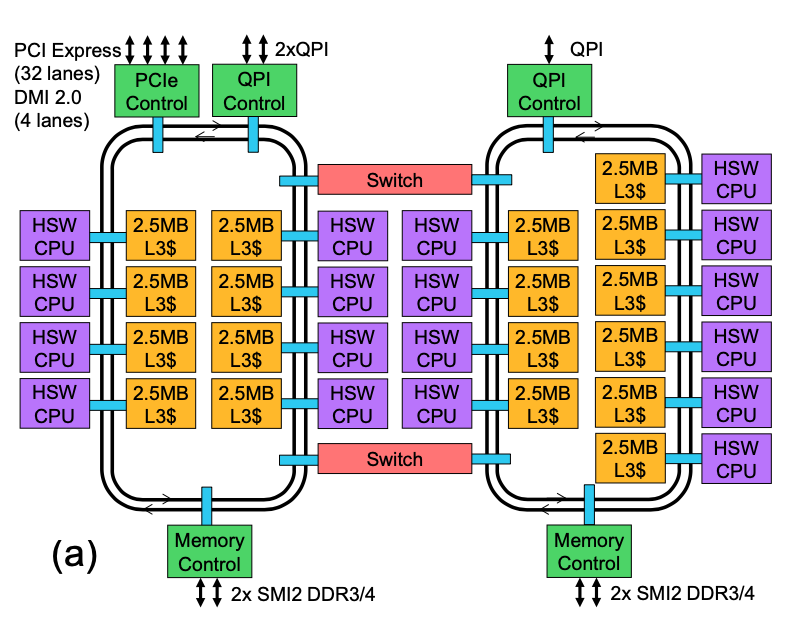
The invalidations and cache-to-cache transfers are implemented by sending message between the caches over an on-chip network.

Here's an example of an on-chip network for an 18-core Intel Haswell processor:

image.png

Sending messages across such a network can be pretty expensive and take quite a long time.

In [5]:
merge_sort = build(code(r"""
//  From https://codereview.stackexchange.com/questions/87085/simple-comparison-of-sorting-algorithms-in-c
#include"cfiddle.hpp"
#include<iostream>
#include<cstdint>
#include<thread>
#include<math.h>
#include<mutex>
#include"threads.hpp"
#include"pthread.h"

void merge(uint64_t *list, int64_t p, int64_t q, int64_t r)
{
//n1 and n2 are the lengths of the pre-sorted sublists, list[p..q] and list[q+1..r]
    int64_t n1=q-p+1;
    int64_t n2=r-q;
//copy these pre-sorted lists to L and R
    uint64_t * L = new uint64_t[n1+1];
    uint64_t * R = new uint64_t[n2+1];
    for(int64_t i=0;i<n1; i++)
    {
        L[i]=list[p+i];
    }
    for(int64_t j=0;j<n2; j++)
    {
        R[j]=list[q+1+j];
    }


//Create a sentinal value for L and R that is larger than the largest
//element of list
    uint64_t largest;
    if(L[n1-1]<R[n2-1]) largest=R[n2-1]; else largest=L[n1-1];
    L[n1]=largest+1;
    R[n2]=largest+1;

//Merge the L and R lists
    int64_t i=0;
    int64_t j=0;
    for(int64_t k=p; k<=r; k++)
    {
        if (L[i]<=R[j])
        {
            list[k]=L[i];
            i++;
        } else
        {
            list[k]=R[j];
            j++;
        }
    }
    delete L;
    delete R;
}

void merge_sort_aux(uint64_t *list, int64_t p, int64_t r, int64_t threshold)
{
    if(p<r)
    {
        int64_t q=floor((p+r)/2);
        if (r - p > threshold) {
            std::thread left(merge_sort_aux, list,p,q, threshold);
            std::thread right(merge_sort_aux, list,q+1,r, threshold);
            left.join();
            right.join();
        } else {
            merge_sort_aux(list,p,q, threshold);
            merge_sort_aux(list,q+1,r, threshold);
        }
        merge(list,p,q,r);
    }

}

extern "C"
void merge_sort(uint64_t size, uint64_t threshold) {
    uint64_t * list = new uint64_t[size];
    start_measurement();
    merge_sort_aux(list, 0, size - 1, threshold);
    end_measurement();
}

"""), build_parameters=arg_map(OPTIMIZE="-O3 -Og"))
display(merge_sort[0].source())
//  From https://codereview.stackexchange.com/questions/87085/simple-comparison-of-sorting-algorithms-in-c
#include"cfiddle.hpp"
#include<iostream>
#include<cstdint>
#include<thread>
#include<math.h>
#include<mutex>
#include"threads.hpp"
#include"pthread.h"

void merge(uint64_t *list, int64_t p, int64_t q, int64_t r)
{
//n1 and n2 are the lengths of the pre-sorted sublists, list[p..q] and list[q+1..r]
    int64_t n1=q-p+1;
    int64_t n2=r-q;
//copy these pre-sorted lists to L and R
    uint64_t * L = new uint64_t[n1+1];
    uint64_t * R = new uint64_t[n2+1];
    for(int64_t i=0;i<n1; i++)
    {
        L[i]=list[p+i];
    }
    for(int64_t j=0;j<n2; j++)
    {
        R[j]=list[q+1+j];
    }


//Create a sentinal value for L and R that is larger than the largest
//element of list
    uint64_t largest;
    if(L[n1-1]<R[n2-1]) largest=R[n2-1]; else largest=L[n1-1];
    L[n1]=largest+1;
    R[n2]=largest+1;

//Merge the L and R lists
    int64_t i=0;
    int64_t j=0;
    for(int64_t k=p; k<=r; k++)
    {
        if (L[i]<=R[j])
        {
            list[k]=L[i];
            i++;
        } else
        {
            list[k]=R[j];
            j++;
        }
    }
    delete L;
    delete R;
}

void merge_sort_aux(uint64_t *list, int64_t p, int64_t r, int64_t threshold)
{
    if(p<r)
    {
        int64_t q=floor((p+r)/2);
        if (r - p > threshold) {
            std::thread left(merge_sort_aux, list,p,q, threshold);
            std::thread right(merge_sort_aux, list,q+1,r, threshold);
            left.join();
            right.join();
        } else {
            merge_sort_aux(list,p,q, threshold);
            merge_sort_aux(list,q+1,r, threshold);
        }
        merge(list,p,q,r);
    }

}

extern "C"
void merge_sort(uint64_t size, uint64_t threshold) {
    uint64_t * list = new uint64_t[size];
    start_measurement();
    merge_sort_aux(list, 0, size - 1, threshold);
    end_measurement();
}


// Cfiddle-signature=ee2e1dd17381436c274d7da7389b48b7

Hyperthreading

Earlier in the lab, we saw that our CPU says it has 12 processors even though it really only has 6. The 6 extra, logical processors are due to hyperthreading, a clever trick that allows two threads to run at exactly the same time on the same processor.

The catch is that the two threads running on the same core compete with each other for resources. This works fine if the two threads need different resources, but if they need the same resources, performance will suffer.

OpenMP

Using locks and threads to parallelize code is notoriously tricky. I chose the histogram and merge sort examples intentionally because they are pretty simple. Fortunately, the compiler can help us a great deal for certain kinds of code.

Compilers have had good success automatically parallelizing code for well-behaved loops. "Well-behaved" means loops with loop bounds that don't change and that increment their index variables by fixed amounts. Many programs fall into this category, including matrix multiplication and our histogram code. Merge sort, by contrast, does not.

OpenMP (Open Multi-Processing) is a widely-used and widely-supported set of extensions for C/C++ (and Fortran, if you're into that) that let the programmer guide the compiler to parallelize loops.

The extensions take the form of #pragmas. OpenMP has many of them, but we will use three:

  • #pragma omp parallel for
  • #pragma omp critical
  • #pragma omp simd

omp parallel for tells the compiler to parallelize the following loop.

omp critical tells the compiler that the next block of code should be treated as a critical section so that only one thread will execute at a time.

omp simd tell the compiler to try to vectorize the loop.

SIMD Parallelism in OpenMP

OpenMP also support SIMD parallelism, which uses vector instructions to improve performance.

Applying SIMD with OpenMP is pretty easy: You just put #pragma omp simd before the loop body. The loop needs to very regular (e.g., constant stride and no branches), and there's no guarantee that the compiler will be able to vectorize it. Indeed, omp simd doesn't speedup our histogram code, so we'll look at a simpler example.

Programming Assignment

For your programming assignment in this lab you'll be optimizing a specialized version of matrix multiply called "matrix exponentiation". The input to your program will be a square matrix, $M$, (stored in a tensor_t) and a power, $p$, and your job is to compute $M^p$ as quickly as possible.

The expression $M^p$ means $M$ multiplied by itself, $p$ times, where multiplication is normal matrix multiplication.

This computation has a variety of applications. For instance, you can use this algorithm to evaluate Markov Chains.

For this assignment we'll be computing on tensor_t<uint64_t>. Many applications would use float or double, but that problem is harder due numerical instability issues. You don't need to worry about integer overflow in this assignment. It will happen a lot, and it's considered the "correct" behavior for the purposes of this lab.

You can apply any optimizations you'd like. So far in this we've discussed:

  1. Improving spatial locality by paying attention to data layout.
  2. Improving temporal locality with tiling.
  3. Improving performance with threads.
  4. Improving performance with vectors.
  5. Paying close attention to constants even if your asymptotic performance is good.

Raising to a Power Efficiently

The reference code takes an efficient approach to computing $M^p$ that called binary exponentiation takes only $O(log p)$ multiplications.

To understand how binary exponentiation works, recall that if we have a number $p$, we can write it's binary representation like this:

$$p = p_kp_{k-1}...p_1p_0$$

Where $p_i$ is a 1 or a zero. Then we have

$$p = \sum_{i=0}^k 2^{i} p_i$$

Now, let's say we want to compute $A^p$:

$$A^p = A^{\sum_{i=0}^k 2^{i} p_i}$$

But remember that

$$A^{x+y} = A^xA^y$$

So we can rewrite $A^p$ as

$$A^p = \prod_{i=0}^k A^{2^{i}}p_i$$

This means that to compute $A^p$ we can compute partial powers $A^{2^i}$ and then take the product of the partial powers where $p_i$ is a 1.
Reference Code

Here's a reference implementation. It is a simple (but not fast) implementation of matrix multiplication and the binary exponentiation algorithm described above.

In [6]:
 
#ifndef MATEXP_REFERENCE_INCLUDED
#define MATEXP_REFERENCE_INCLUDED
#include <cstdlib>

#include <unistd.h>
#include<cstdint>
#include<iostream>
#include"cfiddle.hpp"
#include"walltime.h"
#include"tensor_t.hpp"
#include"util.hpp"

template<typename T>
void
__attribute__((noinline,optimize("Og")))
mult_reference(tensor_t<T> &C, const tensor_t<T> &A, const tensor_t<T> &B)
{
    // This is just textbook matrix multiplication.
    
    for(int i = 0; i < C.size.x; i++) {
        for(int j = 0; j < C.size.y; j++) {
            C.get(i,j) = 0;
            for(int k = 0; k < B.size.x; k++) {
                C.get(i,j) += A.get(i,k) * B.get(k,j);
            }
        }
    }
}


// A simple function to copy the contents of one tensor into another.
template<typename T>
void
__attribute__((noinline,optimize("Og")))
copy_matrix_reference(tensor_t<T> & dst, const tensor_t<T> & src) {
    for(int32_t x = 0; x < dst.size.x; x++)
        for(int32_t y = 0; y < dst.size.y; y++)
            dst.get(x,y) = src.get(x,y);
}

template<typename T>
void
__attribute__((noinline,optimize("Og")))
identity_reference(tensor_t<T> & t) {
    for(int32_t x = 0; x < t.size.x; x++) {
        for(int32_t y = 0; y < t.size.y; y++) {
            if (x == y) {
                t.get(x,y) = 1;
            } else {
                t.get(x,y) = 0;
            }
        }
    }
}

template<typename T>
void __attribute__((noinline)) matexp_reference(tensor_t<T> & dst, const tensor_t<T> & A, uint32_t power, 
                      int64_t p1=0,
                      int64_t p2=0,
                      int64_t p3=0,
                      int64_t p4=0,
                      int64_t p5=0) {

    double started = wall_time();

    // We binary exponentiation to compute A^power. 
    // First, we compute partial powers
    // products[i] will hold A^(2^i)
    std::vector<tensor_t<T>*> products;
        
    products.push_back(new tensor_t<T>(A));
    
    identity_reference(*products[0]); // A^0

    products.push_back(new tensor_t<T>(A)); // A^1

    // Compute A^(2^i).  We only go up to 10, because the lab says p <= 1024
    for(unsigned int i = 2; i <= 10; i++) {
        products.push_back(new tensor_t<T>(A));
        mult_reference(*products[i], *products[i-1],  *products[i-1]);
        if (power < (1u << i)) {
            break;
        }
    }

    identity_reference(dst);
    
    // If bit i of power is set, we should include the A^(2^(i+1)) in the final product.
    for(unsigned int i = 0; i < 10; i++) {

        if ((1 << i) & power) {
            tensor_t<T> tmp(dst);
            mult_reference(dst, tmp, *products[i+1]);
        }
        if (power <= (1u << i)) {
            break;
        }
    }

    for (auto p: products) {
	delete p;
    }
    
    double finished = wall_time();
    std::cerr << "That took " << finished - started << " seconds\n";

}
#endif

Read through the code and comments to make sure you understand what the code is doing. Note that it includes some sub-routines. You should consider optimizing those as well.

Detailed Requirements

The requirements for the lab are pretty simple:

  1. $M$ will be square and it's width/height will be less than 2048.
  2. $p$ will be less than or equal to 1024.
  3. $p$ will be greater than or equal to 0.
  4. Like matexp_reference, your function needs to be a template function, but you can assume that T is always uint64_t.
  5. Values in $M$ can be any uint64_t value.
  6. Your output must match the output of the code in matexp_reference/matexp.hpp.
  7. Your implementation should go in matexp_solution/matexp.hpp. The starter version is just a copy of matexp_reference/matexp.hpp with a different class name.

It defines four functions:

  • matexp_reference_c Calls the starter code with sizexsize matrix and power.
  • matexp_solution_c Calls your code with sizexsize matrix and power.
  • bench_reference Runs benchmarks we will use for grading for the starter code.
  • bench_solution Runs benchmarks we will use for grading for your code.

Recap

Modern computers rely on multiple forms of parallelism to achieve good performance. Instruction-level, memory-level, vector, and thread parallelism all have a role to play. Unfortunately (for programmers), modern processors have reached the limits of how much ILP and MLP can be extracted and exploited from typical programs. For further performance gains, we need to turn to more temperamental forms of parallelism like vectors and thread. Threads provide the most flexible form of parallelism and, given the ever-growing number of cores in modern systems, the most scalable path to high performance. However, extracting thread-level parallelism adds overhead and creates new challenges in optimizing memory usage -- sharing (both false and real) can quickly destroy threads' potential benefits. What's more, Amdahl's law can limit the multi-thread speedup possible for most algorithms.